BART SMITH OFFICIAL WEBSITE • AUTHOR • YOUTUBER • COOKIE BAKER • COOKBOOK CHEF • FUTURES TRADER


Where Is Your Speaker One-Sheet?
by Bart Smith
What is a speaker one-sheet?
A speaker one-sheet is typically a 1- or 2-page PDF file that showcases your speaker services to potential clients who would like to book you to speak at their next event. Speaker one-sheets help event organizers and conference planners quickly learn:
1. What value you offer a potential audience/participants
2. What you speak on and the presentation types you give
3. What previous clients/event organizers say about you
4. How to get a hold of you among other things ...
Speaker one-sheets act like a resume of your speaking talents. It’s the kind of document you can also upload to your website that event planners can download and use to evaluate you as a speaker for their speaker needs.
Event planners often look at several speaker one-sheets when trying to decide what speaker(s) to book for their upcoming event. If they don’t book you now, they might keep your speaker one-sheet on file and call upon you for a future event. Your website will be lost in time, but your speaker one-sheet is in a folder on their computer, most likely, for them to quickly check you out again.
What’s more, this document can be easily passed around to several different event planners when they’re done with it to other event planners, companies and organizations which creates a sort of viral marketing effect for you to promote your speaker services all around the globe!
Why do you need a speaker one-sheet?
Speaker one-sheets make you look like a professional speaker. Without one, who are you? What do you have to offer and with thousands of other speakers having one, why don’t you have one?
While you might think you don’t need it, having one helps increase:
1. The speed to which you can reach the decision-makers who are planning to book speakers for their next event …
2. You make it convenient for them to preview what you have to offer because all they have to do is open their eMail and not hit the web trying to find all your speaker details on your website …
3. You look professional, organized and ready to speak on the topics you mention on your speaker one-sheet …
Let’s say you meet someone at a networking event who wants to book you as a speaker and asks for your speaker one sheet? All you do is log into your eMail on your phone (or computer) and send them a link to your speaker one-sheet on your website. For example:
yoursite.com/your-name-speaker-one-sheet-call-000-000-0000.pdf
Of course, you could also create a simple “redirect url” on your website and call it:
yoursite.com/speaker1sheet
… that redirects to that same, longer PDF file.
One great way to get booked by local meetup groups and professional organizations within your field is to share your speaker one-sheet with them. Once you’ve got your speaker one-sheet designed, it’s fun and easy to start contacting those groups to see if you can speak to them. Just share your speaker one-sheet after you make that initial contact.
Can you have different speaker one-sheets for different speaking niches and clientele? Absolutely. Get creative and have different speaker one-sheets for the different books you’ve written or clients you serve.
What goes on a speaker one-sheet?
I’m glad you asked, A LOT! For example, you definitely want to have your:
1. Photos: head shot, full body action shot of you speaking and an action shot of you speaking to a crowd …
2. Presentation topics …
3. VALUE items audiences will walk away with after you speak …
4. Contact information (i.e., cell#, office#, address, web address, eMail address, social media links, etc.) …
5. Type of speaking engagements you’re available for …
6. Awards, credentials and certificates ...
7. QR Codes that link to your website, etc.
8. Partial client list and client logos if available …
9. Your book, audio and/or video mentions with images …
10. Short Biography …
11. Links to a video gallery or photo gallery showcasing your speaker talents …
12. Testimonials from event planners, hosts, attendees, etc. …
13. FAQ if you have room on your speaker one-sheet …
… among anything else you want to put on your speaker one-sheet.
How do you design a speaker one-sheet?
While you could design your speaker one-sheet “simply” in a Google document or Word document, and then convert your document to a PDF file for distribution, it’s better that you spend some time working with either a graphic design specialist (or doing it yourself if you have the software/skills) who can put some creativity and design flair into your speaker one-sheet. You don’t want it looking like a letter or some plain document. Spice it up, display your brand colors, personality and image you want conveyed as a speaker through your speaker one-sheet.
There are TWO THINGS to keep in mind when designing your speaker-one sheet:
1. CONTENT – Make sure you have all the important sections as mentioned above on your speaker one-sheet.
2. STYLE – Don’t be boring, but create fun, use color (yes, but don’t overdo it), and create an exciting speaker one-sheet to look at. One that pops! Imagine your speaker one-sheet representing you as you would appear on stage and be received by the crowd. EXCITING, right?
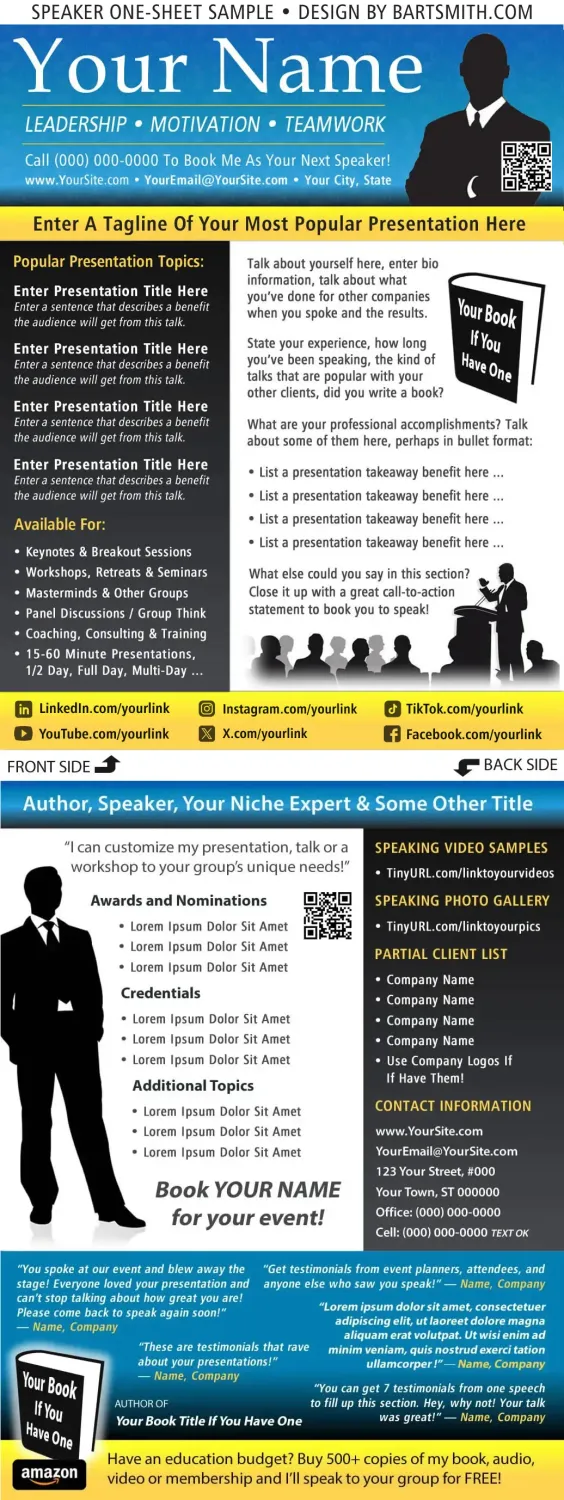
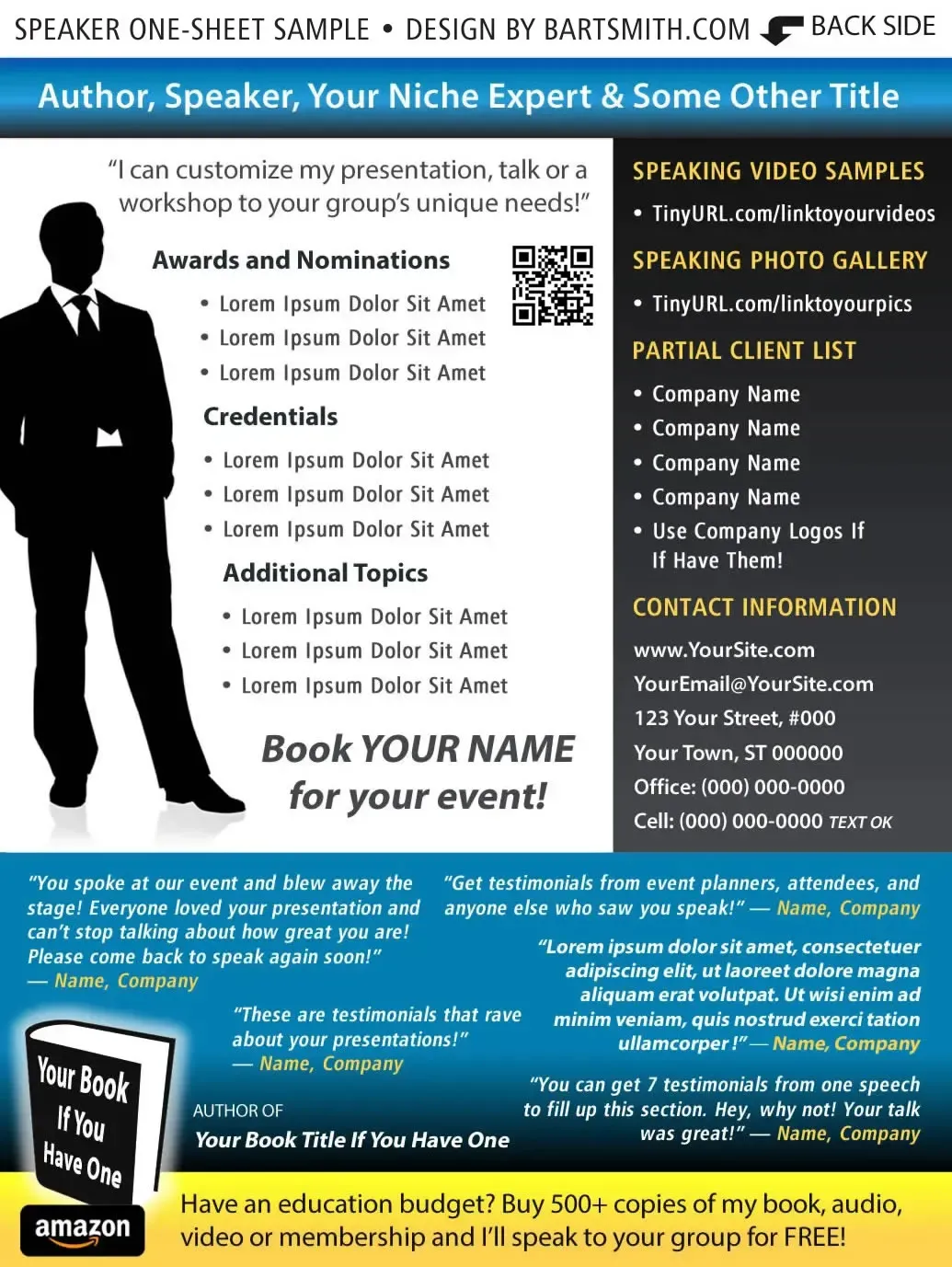
Now, look at the following speaker one-sheet template I designed below. Not that this design is the end all, be all greatest of speaker one-sheet designs, but each page does serve a strategic purpose in providing the right kind of information any event planner would ask for or want to know and without any clutter or blending of text on one sheet with the same white background, etc.
That said, I’ve purposely designed it to show you what goes ON a speaker one-sheet and where. I’ve seen other speaker one-sheets and they’re either boring, not well-designed, scattered with too much information against some terrible backgrounds or (on the contrary) they really were well-designed.
FRONT PAGE
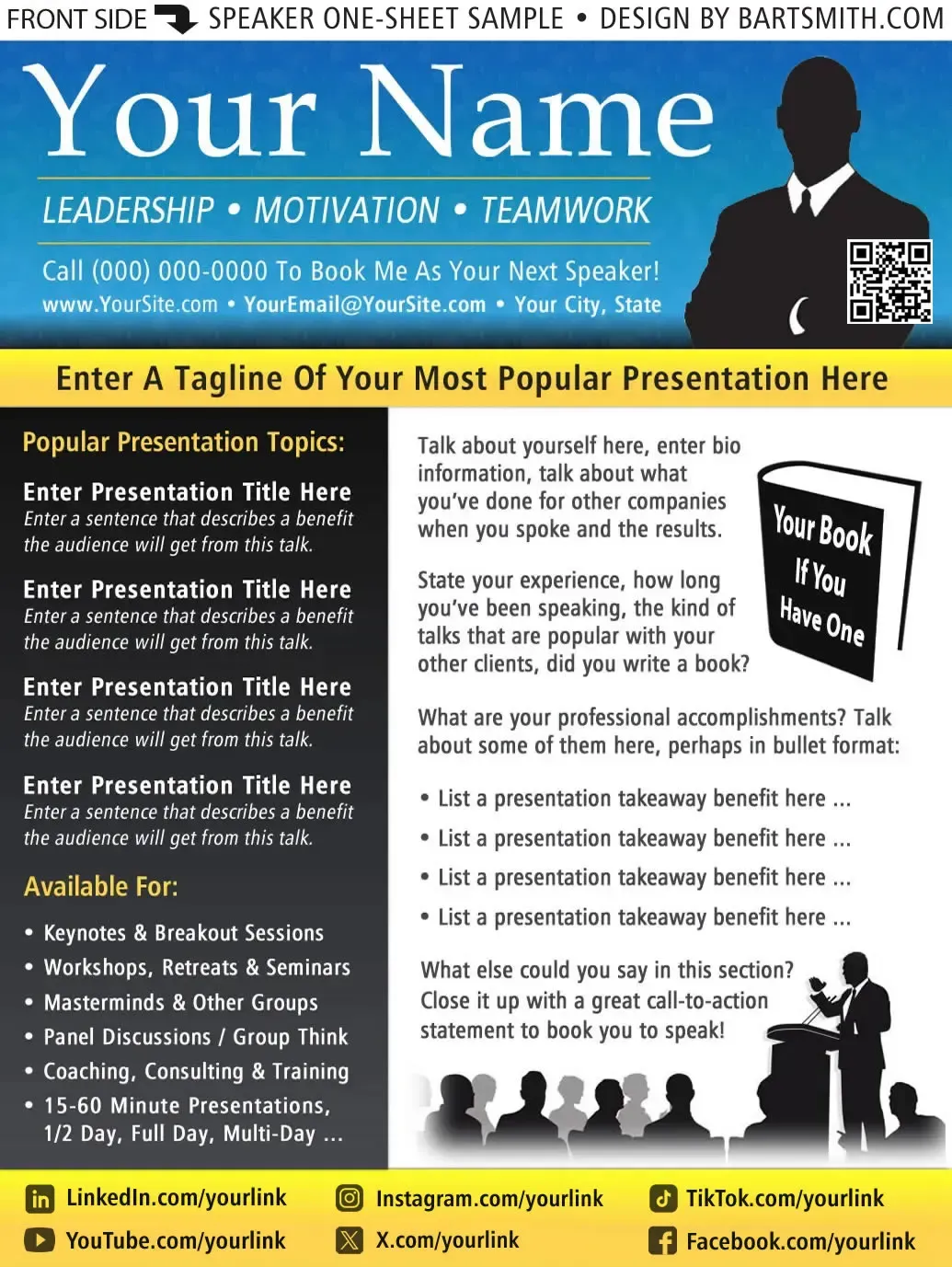
BACK PAGE
Need help with your speaker one-sheet?
For starters, take what you’ve learned above, then:
OPTION #1 → Go to Fiverr.com and search for graphic designers who specialize in creating professional speaker one-sheets. Browse their portfolios, study their layouts, compare their styles and look for examples that catch your eye. There are countless ways to design a speaker one-sheet, so find someone whose work matches your personality, brand and the professional image you want to project. Check their ratings, reviews, pricing, turnaround times and revision policies before making your decision. Then, gather all your content, photos, testimonials, speaking topics and contact information, as discussed above, and send the designer a clear set of instructions. You might say, “I'd like a speaker one-sheet similar in style to these examples from your portfolio, but customized with my branding, photos and content, which I'll provide.” Be sure to request both a high-quality, print-ready PDF and an editable source file so you can easily make updates in the future.
OPTION #2 → Use ChatGPT to help create your speaker one-sheet! Simply upload a few sample speaker one-sheet images or designs you like, along with your biography, speaking topics, professional photos, testimonials, credentials, contact information and other relevant details. Then, ask ChatGPT to help you create a professional, eye-catching speaker one-sheet inspired by those examples but customized to reflect YOUR personality, branding and speaking expertise. AI can help organize your content, improve your wording, suggest layouts, choose colors and develop a polished design. You can even request different versions until you find a style you love! For the best results, have ChatGPT prepare an editable document or provide the content and design guidance for a tool like Canva or Affinity Publisher, where you can fine-tune the layout and export a high-quality, print-ready PDF. It's a fast, affordable way to create a speaker one-sheet without starting from scratch!
OPTION #3 → Use Canva (e.g., if you have a Professional account is best) to design your own professional speaker one-sheet! Canva offers a wide variety of templates, layouts, fonts, graphics and design tools that make it easy to create something attractive without being a professional graphic designer. Browse the available speaker one-sheet, media kit or promotional flyer templates, or use my sample designs above for inspiration. Then customize your favorite layout with YOUR photos, speaking topics, biography, testimonials, branding, colors and contact information. Canva's paid plans offer additional design assets, tools and features, but you can accomplish quite a bit with the free version, too. You can even use Canva's AI-assisted tools to help with writing, layouts and design ideas. Once you're happy with your one-sheet, download a high-quality PDF for printing and digital sharing, and keep the editable Canva version for future updates. The best part? You can create, revise and update your speaker one-sheet yourself whenever you like!
Your speaker one-sheet is more than just a promotional document — it's one of your most valuable tools for getting noticed, making a professional first impression and landing more speaking opportunities. Whether you're approaching event planners, conference organizers, associations, corporations, podcast hosts or anyone looking for a great speaker, make it EASY for them to see who you are, what you speak about, what value you bring to their audience and how to book you.
Keep your one-sheet professional, visually appealing, current and ready to share at a moment's notice. Post it on your website, link to it in your emails, share it with your contacts and put it to work promoting YOU!
Remember, speaking opportunities can appear when you least expect them, so don't wait until someone asks for your information to scramble and put something together. Get it done, get it online and get it working for you! So, let me ask you one more time ... WHERE IS YOUR SPEAKER ONE-SHEET?
# # #
THE END
Website Design by Bart Smith
© Bart Smith | All Rights Reserved