BART SMITH OFFICIAL WEBSITE • AUTHOR • YOUTUBER • COOKIE BAKER • COOKBOOK CHEF • FUTURES TRADER


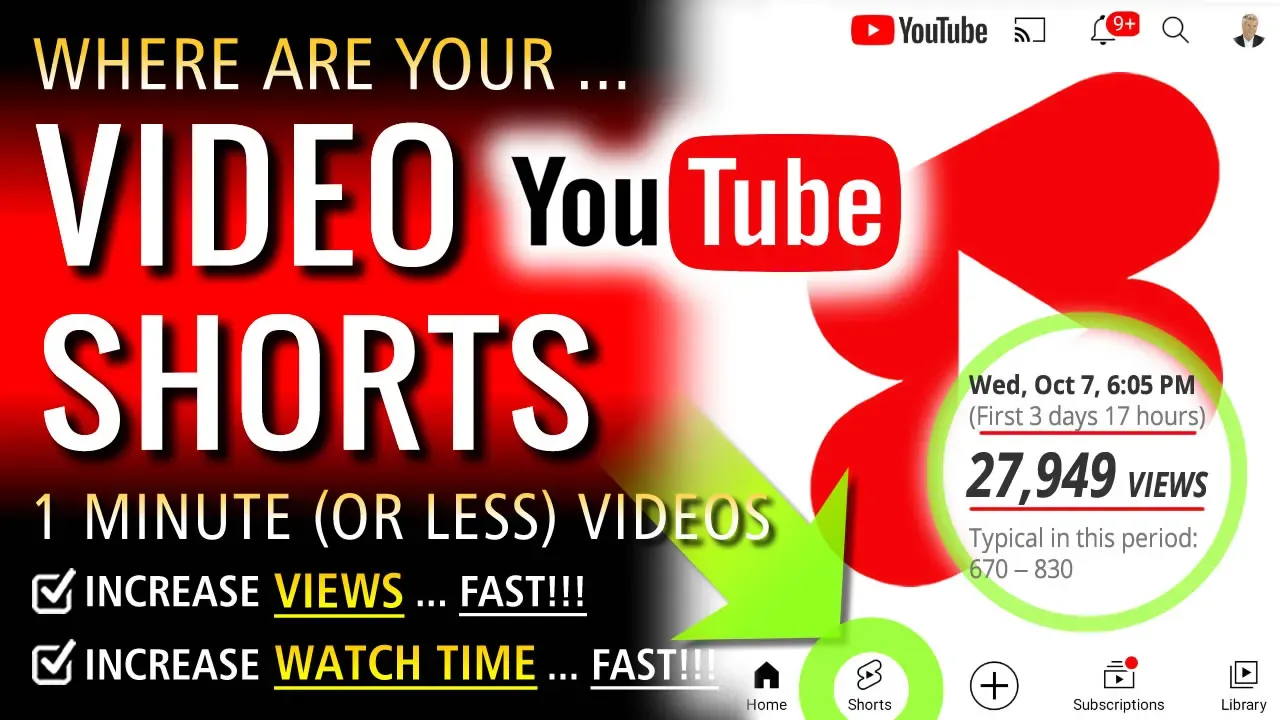
Where Are Your YouTube Shorts?
by Bart Smith
What are YouTube Shorts?
YouTube Shorts are vertical, short-form videos on YouTube that can last up to three minutes long.
Key Features
Format: Vertical (9:16 aspect ratio) designed for mobile phone screens.
Duration: Up to three minutes maximum.
Navigation: Viewers swipe up to watch an endless feed of quick clips, similar to TikTok or Instagram Reels.
How They Work
Creation: Creators can shoot, edit, and add music directly inside the mobile app or upload pre-made vertical video files.
Discovery: They appear on the dedicated Shorts shelf, the homepage feed, and user subscription tabs.
Monetization: Eligible creators can earn ad revenue based on their view counts.
How do I access YouTube Shorts?
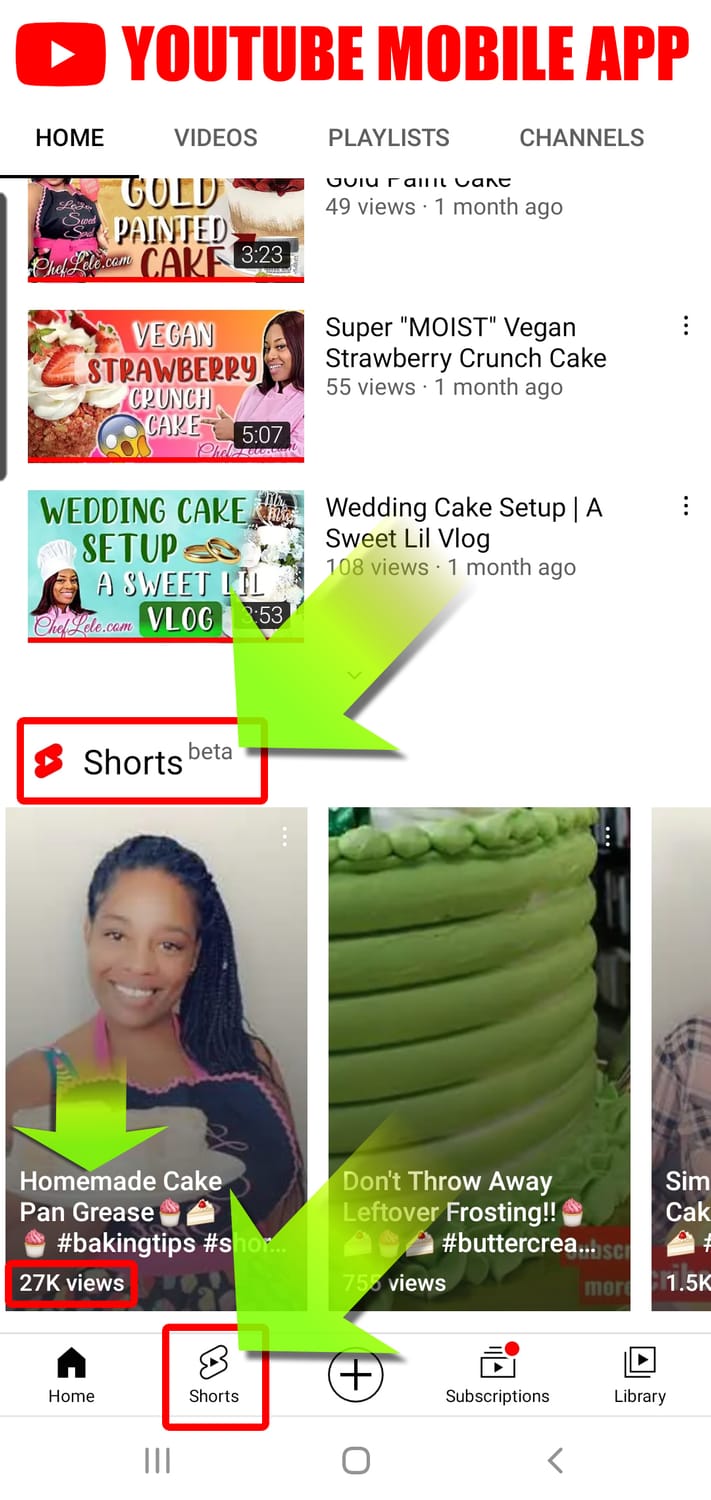
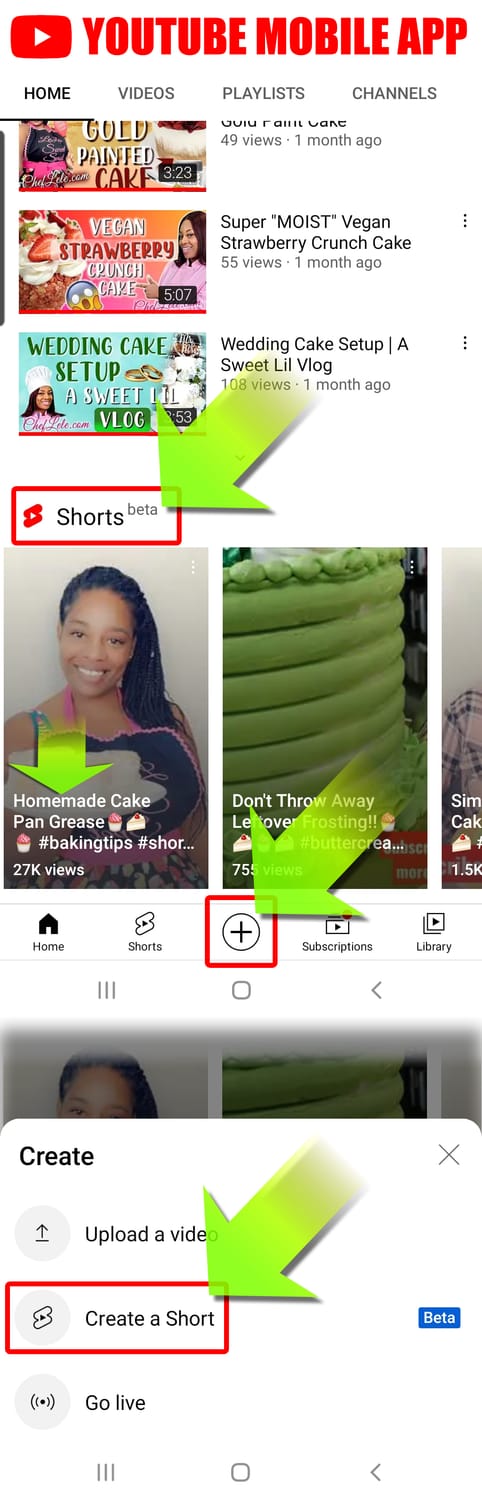
To use it, just open up the YouTube app you already have on your smartphone. Scroll down slightly, and you'll see a "Shorts" section. You'll also notice that a "Shorts" button has replaced the "Explore" tab at the bottom of the screen, alongside "Home," "Subscriptions," "Library," and the create button.
Why are YouTube Shorts so popular?
YouTube Shorts have experienced a massive surge in popularity because they provide rapid, bite-sized vertical video content tailored perfectly to modern, fast-paced digital viewing habits. This immense growth is heavily fueled by YouTube’s sophisticated recommendation engine, which actively prioritizes high-retention short-form clips to maximize immediate user engagement and seamless, continuous feed scrolling.
At the same time, the platform has fundamentally optimized the viewing ecosystem by introducing key features like a 2x playback speed option for lightning-fast consumption alongside a powerful algorithmic push toward highly original, deeply engaging content rather than simple reuploads.
Do you get paid on YouTube Shorts?
Yes, YouTube pays for Shorts through the YouTube Partner Program via ad revenue sharing and fan funding. To qualify for ad revenue sharing on Shorts, your channel must meet these thresholds: (1) Have at least 1,000 subscribers. (2) Reach 10 million valid public Shorts views in the last 90 days (or 4,000 long-form watch hours). (3) Follow all YouTube Shorts monetization policies and accept the Shorts Monetization Module.
Requirements to make YouTube Shorts
YouTube Shorts can be up to 3 minutes long, allowing vertical and square videos lasting between 60 seconds and 180 seconds to qualify as a Short. The in-app mobile Shorts camera is still restricted to recording clips up to 60 seconds; longer videos up to 3 minutes must be edited externally and uploaded via desktop or the standard upload flow.
What is an example of a YouTube Short going viral?
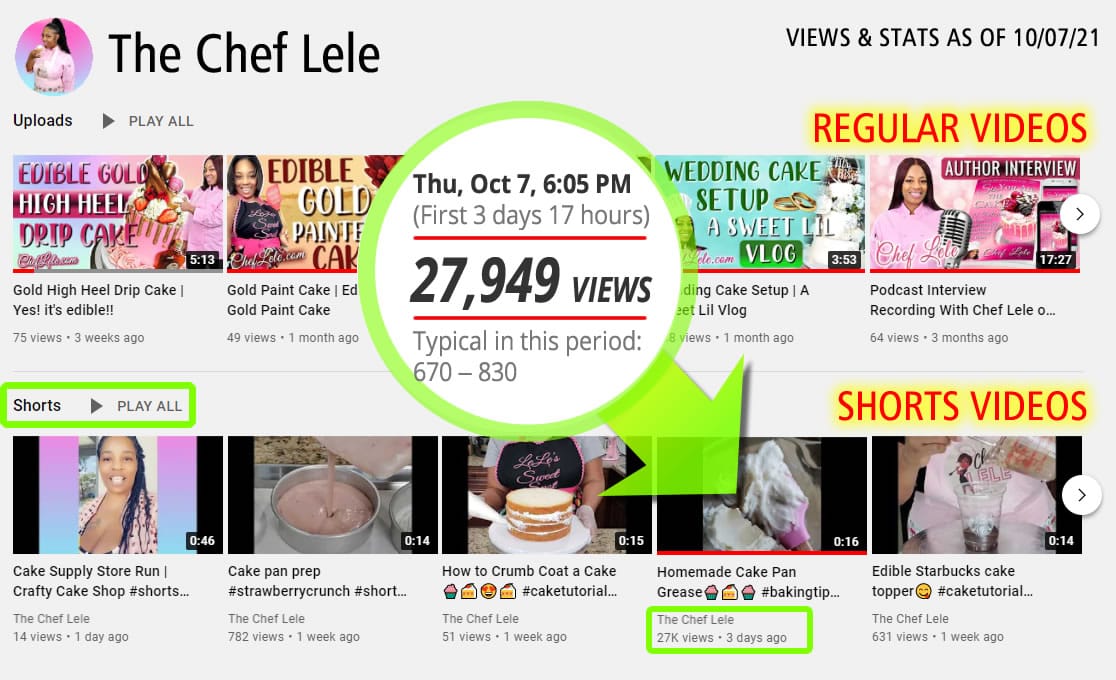
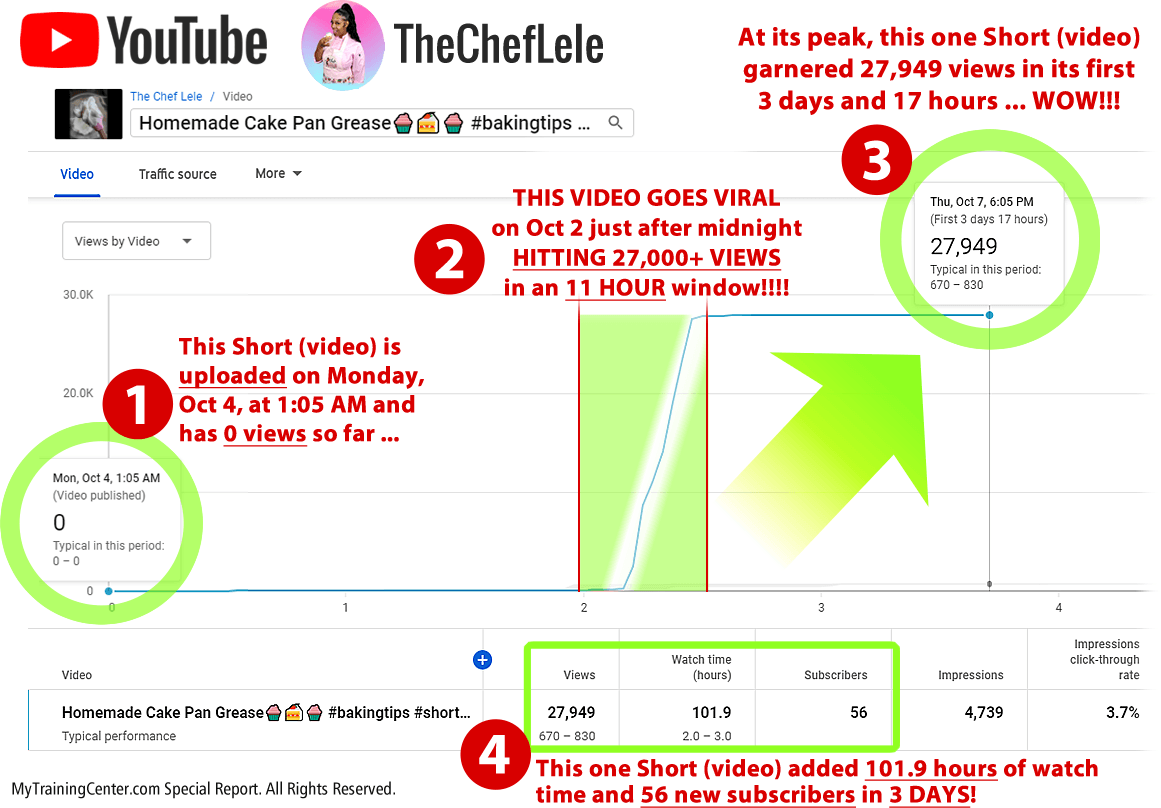
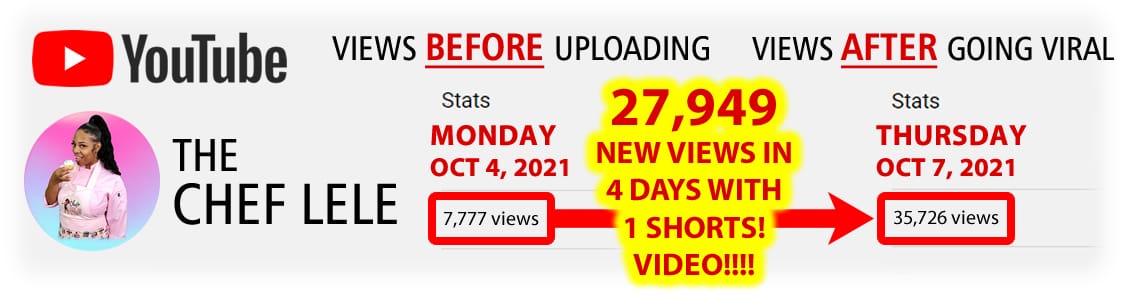
I have a good friend and client who I helped start adding video to her YouTube channel as of June. Around September 20, she started uploading Shorts to her YouTube channel through her phone. As you can see, her Shorts garnered more views than her regular videos. So, she kept at it. Then, one day, October 6, she uploaded another Short at 1:00 A.M. PST. Within 11 HOURS, it garnered 27,710 views from when it was initially uploaded! To me, THAT is a video GONE VIRAL! I remember watching the stats just go up and Up and UP every 3-5 minutes. For example, we'd watch the view count jump 500 views in less than 10 minutes! It was INSANE!
Do YouTube shorts views count towards your overall views count?
If a Short is viewed on the Shorts shelf, a display area for brief, vertical videos, it won't earn YPP (YouTube Partner Program) watch hours. But if the same video is viewed on a regular watch page with YouTube ads and a comment section, you can earn eligible Watch Time.
Why wouldn't your YouTube Shorts get any views?
Your YouTube Shorts might not be getting any views because the content or optimization is failing to trigger the algorithm's initial testing phase. When you upload a Short, YouTube shows it to a small, random seed audience. If that audience scrolls away immediately, the algorithm stops pushing it.
How many YouTube Shorts can or should you upload?
You can technically upload up to 100 videos per day if your account is fully verified with advanced features enabled, though the platform typically restricts unverified or new accounts to roughly 8 to 15 uploads daily. For the best growth results without triggering spam filters or burning out, you should aim to upload 1 to 3 high-quality Shorts per day (or 3 to 5 Shorts per week if you are a solo creator).
Are YouTube Shorts worth it?
YouTube Shorts are worth it if your primary goal is rapid subscriber growth and top-of-funnel channel discovery, but they are not worth it if your sole objective is immediate ad revenue. Short-form video acts as a powerful discovery engine because YouTube Shorts Statistics show the feed drives the vast majority of new viewer impressions. However, the economic reality of the YouTube Partner Program means short-form payouts are structured differently than traditional videos.
Are short videos good for YouTube?
Because 60% of viewers drop off within two minutes, shorter video formats can dramatically boost completion rates. Keeping your content brief naturally leads to higher retention, capturing and holding your audience's attention far more effectively. Today, millions of viewers choose short-form videos because rapid, focused clips allow their minds to digest a high volume of information without the fatigue of a long-form video.
How will viewers find my short videos?
Right now, viewers may find your Shorts by:
Tapping on the Shorts icon at the bottom of the YouTube app.
They may find Shorts on the YouTube homepage.
In their notifications.
Checking their Subscriptions.
Featured on your channel page.
Once they tap into a Short, viewers can scroll to watch more short videos. Wherever they find them, subscribers gained from watching your Shorts count toward your Awards Program milestones.
What type of content is great to film YouTube shorts for?
Here are a number of categories that YouTube shorts are great for creating:
General Interest
Education & Training
Tips, How-To, Advice
Food, Cooking, Beverages
People & Blogs
Brand Promotion
Product Reviews
Service Reviews
Entertainment
Music & Dance
Science & Tech
Acting, Skits, Comedy
Various Messages
Gaming & Sports
Animation
How To Start Producing YouTube Shorts
STEP #1: MAKE A LIST OF VIDEO SHORTS IDEAS
Make a list of videos you want to create that are 15 to 60 seconds long. Focus on defining one clear, hyper-focused idea per clip—like answering a single question or sharing one fast tip—so viewers don’t get confused. Aim for a sweet spot of 15 to 30 seconds for your first few videos to master the pacing. I made a list of 100 ideas, but you can try making a list of 20 to 50 to start. Then, simply add to that list as new ideas come to you!
STEP #2: CATEGORIZE & PRIORITIZE YOUR LIST
Organize your list of video concepts into distinct topical categories. Once grouped, prioritize your videos by asking: Which videos are the easiest and fastest to make? Place those highly accessible, low-friction concepts at the top of each category list. This allows you to grab your smartphone, shoot vertically in a strict 9:16 aspect ratio (1080x1920 pixels), and build immediate creative momentum without getting bogged down by complex setups.
STEP #3: START MAKING YOUR YOUTUBE SHORTS!!!
That's right! Start and don't stop. As you begin filming, focus heavily on the execution:
Design an immediate hook: Spend extra time on the first 2 seconds of your video. Start mid-sentence, with rapid action, or with a bold on-screen statement to stop users from swiping away.
Edit for fast pacing: Cut out every single breath, pause, and extra millisecond of silence using apps like YouTube Create or CapCut.
Optimize for silent viewers: Add bold auto-captions and a punchy title under 50 characters with the #Shorts hashtag.
Study your stats as your videos start to gain views. Check your YouTube Studio analytics after 48 hours to evaluate your Viewed vs. Swiped Away percentage and audience retention. Which videos garner the most attention and keep people watching past the 2-second mark? Make more of those videos!
# # #
THE END

Website Design by Bart Smith
© Bart Smith | All Rights Reserved